

Here is how to make a tech pack: sketch the garment front and back, specify the fabric, list every material in a bill of materials, add a graded measurement chart with tolerances, then record stitching, artwork, labels and packaging. This guide walks through all ten steps using a gym T-shirt example and includes a free Excel template.
Learning how to make a tech pack comes down to one test: if a sewing team could build your sample without contacting you, the document is complete. Most first tech packs fail that test in three places: measurements without tolerances, fabric described by feel, and artwork with no size or position.
What Is a Clothing Tech Pack?
A clothing tech pack is the technical file that turns a design into instructions a factory can quote, sample and inspect against. The sketch shows what the garment looks like; the tech pack defines what it is made of, how big each size is and how it is sewn.
Before learning how to make a tech pack for clothing, know who reads it: a pattern maker uses the measurements, the cutting room uses the bill of materials, and the inspector checks finished pieces against your tolerances. For gym wear, stretch fabric, flat seams and print placement on a moving body raise the stakes. Whether you work with a local cut-and-sew shop or a partner offering fitness apparel manufacturing for USA brands, the factory can only build what your tech pack actually specifies.
What Should Be Included in a Tech Pack?
Anyone learning how to make a tech pack works from the same core sections. Most are essential for every garment; a few depend on the product.
| Section | What It Records | Needed For |
|---|---|---|
| Product overview | Style number, fit, size range, sample size, units | Every garment |
| Technical flat sketches | Front and back line drawings with callouts | Every garment |
| Fabric specifications | Fiber composition, GSM, knit or weave, stretch, finish | Every garment |
| Bill of Materials (BOM) | Every fabric, trim, thread, label and packaging item | Every garment |
| Measurement specifications | Points of measure, sample size values, tolerances | Every garment |
| Size grading | Measurements for every size, or grade rules | Any multi-size style |
| Construction and stitching | Seam types, stitch classes, stitches per inch | Every cut-and-sew garment |
| Colorways | Color names and Pantone references for each part | Every garment |
| Artwork and branding | Logo files, method, size, exact placement | Branded garments |
| Labels and packaging | Labels, hangtags, folding, bags, cartons | Retail or ecommerce goods |
| Revision history | Version, date, what changed and why | Every garment |
Artwork, labels and packaging can be lighter for team kit or uniforms. Revision history becomes essential the moment a second version exists.
How to Make a Tech Pack Step by Step
These steps cover how to make a tech pack for beginners and experienced designers alike. Work through them in order, because each one depends on the decisions before it.
Step 1: Define the Garment and Design Requirements
Write one page that states exactly what you are making before you draw anything. Include the style name, style number, gender, category, fit, intended use, target retail price, size range and sample size.
Example: Men's Training Tee, style BGW-TEE-001, regular athletic fit, crew neck, short sleeve, for gym training and running. Sizes S to XXL, sample size M, all measurements in inches.
The sample size is the base size the factory patterns first; every other size is graded from it.
Step 2: Create Front and Back Technical Drawings
Draw flat sketches: proportional line drawings of the garment laid flat, without a body or shading. Show the front and back, plus close-ups of details a full view hides, such as the neckline.
Add callouts with arrows pointing to each feature: "1x1 rib neckband, 5/8 in finished," "twin-needle coverstitch hem, 1 in." Show stitching as dashed lines where it will be visible.
Tools: Adobe Illustrator is the industry standard, but Inkscape is free and produces the same vector files. A neat hand sketch, scanned and labeled, is acceptable for a first sample if the proportions are right.
Step 3: Specify Fabric Composition, GSM, Stretch and Finish
Describe fabric by measurable properties, never by feel. This is where beginners learning how to make a tech pack most often go wrong: "soft and stretchy" gives a factory nothing to source against.
| Property | What to State | Gym Tee Example |
|---|---|---|
| Fiber composition | Fibers and percentages by weight | 92% polyester, 8% spandex |
| Construction | Knit or weave type | Single jersey knit |
| Weight | GSM (grams per square meter) with tolerance | 165 GSM, ±5% |
| Stretch | Direction and approximate percentage | 4-way, about 50% width, 30% length |
| Recovery | Return to original size after stretching | Must recover fully; confirm by test on sample |
| Finish | Treatments | Moisture-wicking finish, anti-pill |
| Color standard | How color is approved | Lab dip matched to supplied Pantone TCX reference |
GSM is fabric weight in grams per square meter; performance tees often sit around 140 to 180 GSM. If you are unsure which fabric suits your product, compare performance fabric options for gym wear before you lock the specification.
Step 4: Build a Bill of Materials
A bill of materials (BOM) lists every component in the finished, packed garment. Anything missing from it will be skipped or substituted. Give each line a number, component, specification, placement, color, supplier and quantity per garment, and include thread, labels and packaging. The full gym tee BOM appears in the example below.
Step 5: Add Garment Measurements and Grading
If you master one part of how to make a tech pack, make it the measurement chart, often called the spec sheet. Build it from points of measure (POM): defined positions on the garment, each with a code, a written method and a tolerance.
- List each POM with a letter code that matches a diagram.
- Describe exactly how to measure it, for example "chest width, 1 in below armhole, edge to edge, garment flat."
- Enter the sample size value.
- Set a tolerance: the amount a finished piece may be over or under spec and still pass.
- Add the grade increment, the amount each measurement changes between sizes.
- Calculate every size from the base size and increment.
State that garments are measured flat and relaxed. On stretch fabric, a chest measured under tension can read 1 in larger.
Step 6: Record Stitching and Construction Details
List every seam, the stitch type used and the stitch density. Stitch types are identified by class numbers from the ASTM D6193 standard, which most factories recognize.
| Stitch Class | Common Name | Typical Gym Wear Use |
|---|---|---|
| 301 | Lockstitch | Label attachment, topstitching on woven parts |
| 406 | Two-needle coverstitch | Hems on knit tees and leggings |
| 504 / 514 | 3-thread / 4-thread overlock | Seams on knits where bulk is acceptable |
| 607 | Flatlock (4-needle, 6-thread) | Flat, low-chafe seams on performance wear |
Add stitches per inch (SPI), seam allowance, hem depth and reinforcement, such as clear elastic tape that stops knit shoulder seams stretching out.
Example: Side seams and sleeve attach in 607 flatlock, 12 to 14 SPI. Bottom hem 1 in, 406 coverstitch. Shoulder seams 514 overlock with 3/8 in clear elastic tape.
Step 7: Specify Logos, Labeling and Artwork Placement
For each piece of artwork, record five things: the file, the method, the finished size, the colors and the position measured from fixed points on the garment.
| Artwork | Method | Finished Size | Color | Placement |
|---|---|---|---|---|
| Chest logo | Silicone heat transfer | 3.5 in W x 1.25 in H | White | Left chest, top edge 7 in below HPS, center 4 in from center front |
| Neck label | Tagless heat transfer | 2.5 in W x 1.5 in H | PMS Cool Gray 7 C | Inside center back neck, 1 in below neck seam |
HPS means high point shoulder, where the shoulder seam meets the neckline. It is the most common reference point for placement on tops.
On stretch fabric, silicone and plastisol transfers flex with the garment, sublimation suits polyester-rich fabric, and embroidery can pucker light knits. Send vector artwork (AI, EPS, SVG or PDF) with fonts outlined.
For US sale, labels have legal content. The FTC labeling requirements call for fiber content by percentage, country of origin and your company name or RN number. On garments with a neck, the country of origin must appear at the inside center of the neck. Under the FTC Care Labeling Rule, care instructions must be permanent and legible for the product's useful life.
Step 8: Add Colorways and Packaging Instructions
List each colorway with the color of every part: body, rib, thread, print. Use Pantone references for fabric (TCX for textiles) and solid coated references for inks, and approve physical lab dips rather than screen colors.
Then specify packaging: folded size, poly bag size and warning text, sticker or UPC position, units per carton and size ratio. Goods in the wrong format get repacked at your cost.
Step 9: Review the Document and Assign Revision Details
Use this checklist as the final stage of how to make a tech pack, before anything reaches a factory:
- Every POM on the chart appears on the measurement diagram.
- Every BOM line has a quantity and a color.
- Artwork sizes and placements use the same units as the spec sheet.
- Each colorway lists every part.
- Labels include fiber content, country of origin, RN or company name, and care.
- The cover page shows the version number and date.
Give the document a version number (v1.0 for the first send) and a file name that includes the style and date, such as BGW-TEE-001_v1.0_2026-10-27. Every later change gets a new version and a line in the revision log.
Step 10: Send the Tech Pack and Manage Sample Feedback
Send a PDF plus the editable Excel workbook and vector artwork. When the sample arrives, measure every POM, record the actual value next to spec and mark anything out of tolerance.
Write numbered, measurable comments, such as "POM B chest width 21.5 in, spec 20.5 in, reduce 1 in," never "fits too big." Then update the tech pack, raise the version number and resend it.
Example Tech Pack for a Custom Gym T-Shirt
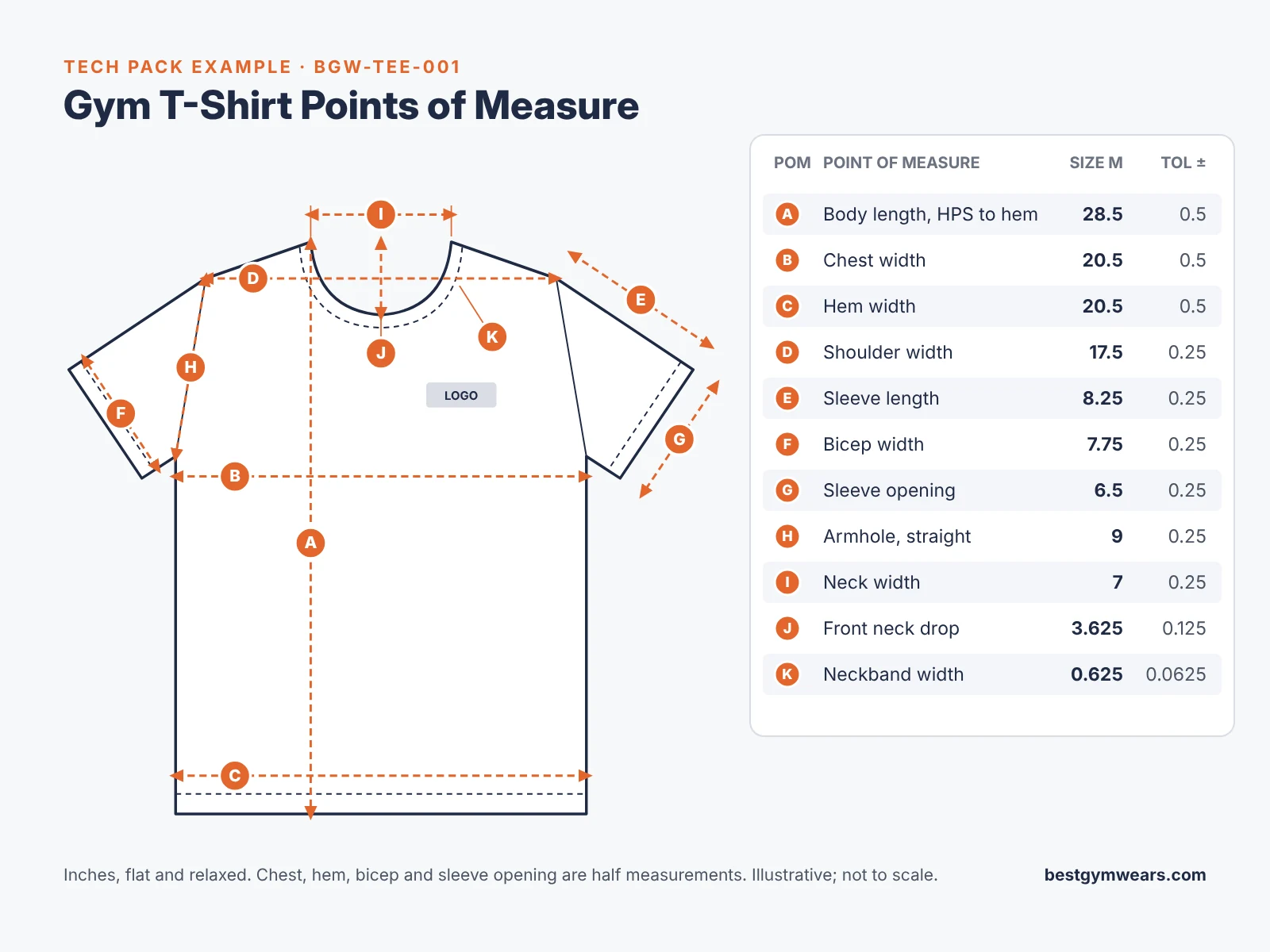
Seeing a completed file is the fastest way to understand how to make a tech pack. The specifications below are illustrative for a men's performance tee, not universal standards; have a garment technician validate measurements, tolerances and testing before production.
Product Overview
| Field | Entry |
|---|---|
| Style name / number | Men's Training Tee / BGW-TEE-001 |
| Category / fit | Short-sleeve crew neck tee, regular athletic fit |
| Size range / sample size | S, M, L, XL, XXL / M |
| Fabric | 92% polyester, 8% spandex single jersey, 165 GSM ±5% |
| Colorway | Black body and rib, white chest logo |
| Units | Inches, measured flat and relaxed |
| Version | v1.0, 27 Oct 2026 |
Measurement Specifications
| POM | Point of Measure | Tolerance (±) | Grade | S | M (Sample) | L | XL | XXL |
|---|---|---|---|---|---|---|---|---|
| A | Body length, HPS to hem | 0.5 | 1 | 27.5 | 28.5 | 29.5 | 30.5 | 31.5 |
| B | Chest width, 1 in below armhole | 0.5 | 1.5 | 19 | 20.5 | 22 | 23.5 | 25 |
| C | Hem width, edge to edge | 0.5 | 1.5 | 19 | 20.5 | 22 | 23.5 | 25 |
| D | Shoulder width, seam to seam | 0.25 | 0.75 | 16.75 | 17.5 | 18.25 | 19 | 19.75 |
| E | Sleeve length, shoulder point to hem | 0.25 | 0.25 | 8 | 8.25 | 8.5 | 8.75 | 9 |
| F | Bicep width, 1 in below armhole | 0.25 | 0.5 | 7.25 | 7.75 | 8.25 | 8.75 | 9.25 |
| G | Sleeve opening width | 0.25 | 0.25 | 6.25 | 6.5 | 6.75 | 7 | 7.25 |
| H | Armhole, straight | 0.25 | 0.5 | 8.5 | 9 | 9.5 | 10 | 10.5 |
| I | Neck width, seam to seam | 0.25 | 0.25 | 6.75 | 7 | 7.25 | 7.5 | 7.75 |
| J | Front neck drop, HPS to seam | 0.125 | 0.125 | 3.5 | 3.625 | 3.75 | 3.875 | 4 |
| K | Neckband width | 0.0625 | 0 | 0.625 | 0.625 | 0.625 | 0.625 | 0.625 |
Note: Width measurements are half measurements, taken across the garment laid flat. Do not double them.
Bill of Materials
| # | Component | Specification | Placement | Color | Qty per Garment |
|---|---|---|---|---|---|
| 1 | Main fabric | 92/8 polyester-spandex single jersey, 165 GSM, 60 in cuttable | Body, sleeves | Black, approved lab dip | About 0.6 yd, confirm from marker |
| 2 | Neck rib | 1x1 rib, 92/8 polyester-spandex | Neckband | Match body | About 0.05 yd |
| 3 | Clear elastic tape | 3/8 in wide | Shoulder seams | Clear | 16 in |
| 4 | Thread | Polyester needle thread, textured polyester looper thread | All seams | Match body | Per marker |
| 5 | Chest logo | Silicone heat transfer, 3.5 x 1.25 in | Left chest | White | 1 |
| 6 | Neck label | Tagless heat transfer, 2.5 x 1.5 in | Inside center back neck | PMS Cool Gray 7 C | 1 |
| 7 | Care label | Printed satin, 1 x 2 in | Left side seam, 3 in above hem | White | 1 |
| 8 | Poly bag | 10 x 13 in, self-seal, printed suffocation warning | Individual pack | Clear | 1 |
| 9 | Size and UPC sticker | 2 x 1 in | Poly bag, top right | White | 1 |
| 10 | Export carton | 5-ply corrugated | Shipping | — | — |
Construction, Labels and Packaging
- Seams: side seams and sleeve attach in 607 flatlock, 12 to 14 SPI; shoulders in 514 overlock with clear elastic tape.
- Neckband: attached with 514 overlock, topstitched with 406 coverstitch.
- Hems: body hem 1 in, sleeve hem 0.75 in, both 406 coverstitch.
- Neck label content: brand, size, 92% polyester 8% spandex, country of origin, RN number.
- Care label content: machine wash cold, tumble dry low, do not bleach, do not iron print.
- Packaging: fold to 9 x 12 in with logo facing up, one per poly bag, size sticker top right, 40 pieces per carton in a 1:2:2:2:1 S to XXL ratio (5, 10, 10, 10, 5).
How to Make a Tech Pack in Excel
If you want to learn how to make a tech pack in Excel, you have picked the most practical tool: every factory can open the file, and you can update it without design software. Here is how to make a clothing tech pack workbook from scratch.
- Create one worksheet per section. Name the tabs Overview, BOM, Measurements, Artwork, Construction, Packaging and Revisions. Put the style number and version in the same cell on every tab so each printed page identifies itself.
- Build the measurement chart with formulas. Enter the sample size value and grade increment, then let Excel calculate the rest. If M is in F6 and the grade is in D6, L is =F6+D6 and S is =F6-D6.
- Add sample check columns. Next to the spec columns, add "Sample actual" and "Difference." Use conditional formatting with a formula such as =ABS(J6-F6)>C6 to turn any out-of-tolerance measurement red.
- Create the BOM as a table. Select the range and press Ctrl+T so rows sort and filter cleanly. Use Data > Data Validation to make dropdown lists for fields like unit (yd, in, pc) and status (proposed, approved).
- Add design references. Insert flat sketches and artwork mockups with Insert > Pictures. In Microsoft 365, choose Place in Cell so images stay attached to their row when you sort.
- Record revisions. On the Revisions tab, log the version, date, author, tab changed and a one-line description. Never overwrite an old version; save a new file instead.
- Export for sharing. Set print areas, use Page Layout > Print Titles to repeat header rows, and scale each tab to one page wide. Then use File > Export > Create PDF and select Entire Workbook. Send the PDF with the original XLSX.
Free Gym Wear Tech Pack Template
The template is the shortcut: instead of reading about how to make a tech pack, you fill one in. It has the seven worksheets above plus a How to Use tab, with grading formulas and out-of-tolerance highlighting built in.
Download two versions:
- Blank template: every field empty and ready for your style.
- Gym T-shirt example: the BGW-TEE-001 specification from this article, filled in, so you can see how each field should look.
| Worksheet | What You Fill In |
|---|---|
| 1 Product Overview | Style details, sizes, sample size, units, sketches |
| 2 Bill of Materials | Components, specifications, placement, color, supplier, quantity |
| 3 Measurement Specifications | POMs, tolerances, grade, sizes, sample check |
| 4 Artwork and Branding | File, method, size, colors, placement |
| 5 Construction Details | Seam location, stitch class, SPI, seam allowance, notes |
| 6 Packaging | Fold, bag, sticker, carton, size ratio |
| 7 Revisions and Sample Feedback | Version log and numbered sample comments with status |
Common Tech Pack Mistakes to Avoid
Most sample delays trace back to the same errors. Avoiding them is part of learning how to make a tech pack that works the first time.
| Mistake | What Happens | Correction |
|---|---|---|
| Missing measurements | The factory uses its own block | Specify every POM with a diagram |
| Unspecified fabric | A substitute appears in the sample | State composition, GSM, stretch, finish |
| Unclear artwork dimensions | Logos arrive the wrong size or position | Give finished size and distance from HPS |
| No tolerances | No basis to accept or reject bulk | Add a ± value to every POM |
| Inconsistent grading | Sizes jump unevenly | One grade increment per POM, calculated by formula |
| Wrong stitch specification | Bulky seams chafe during training | Name the stitch class and SPI per seam |
| No revision control | The factory sews from an old version | Version every file and log each change |
| Incomplete packaging | Goods are repacked at your cost | Specify fold, bag, sticker, carton ratio |
What Happens After You Send a Tech Pack to a Manufacturer?
Knowing how to make a tech pack is half the job; the other half is managing what happens after you send it. A typical sequence:
- Technical review: the factory flags missing or conflicting details.
- Feasibility check: fabric, trims and decoration are confirmed against your target cost.
- Clarifications: answer questions in a revised tech pack, not only by message, so the file stays the single source of truth.
- Sampling: a pattern is made in your sample size and a first sample is sewn.
- Fit evaluation: measure the sample against your chart and try it on a fit model in your sample size.
- Revisions: send numbered corrections and an updated version. Budget for at least two rounds on a new style.
- Sample approval: sign off a sample in writing; it becomes the reference for bulk.
- Production confirmation: quantities, size ratio, colors and delivery terms are confirmed before cutting.
This order mirrors our own production process from brief to dispatch. At Best Gym Wears, sampling is available before every bulk order, and minimums start at 20 pieces per style, which makes it practical to test a new tech pack on a small first run.
Frequently Asked Questions
Can I make a tech pack without Adobe Illustrator?
Yes. Learning how to make a tech pack does not require paid software. Inkscape is a free vector program, and a labeled hand sketch works for a first sample. The specifications, which matter more than the drawing, can live in Excel or Google Sheets.
Do I need a tech pack for a simple gym T-shirt?
It depends on what you are changing. If you are printing your logo on an existing style, a short brief covering artwork, placement, labels and quantities is usually enough. If you are setting your own fit, fabric or construction, you need a full tech pack.
What is the difference between a tech pack and a design sketch?
A design sketch shows how the garment should look. A tech pack defines how it is made: materials, measurements, tolerances, stitching and finishing. A factory can quote and inspect against a tech pack but not against a sketch.
How detailed should a clothing tech pack be?
Detailed enough that two factories would quote and sample the same garment. When deciding how to make a tech pack detailed enough, specify every choice you would not want a factory making for you, such as fabric weight, stitch type or logo position.
Can a manufacturer help create a tech pack?
Many OEM manufacturers can build a tech pack from a reference garment or sketch. You still review and approve every measurement and material. Ask in writing who owns the finished pattern and tech pack files before work starts.
Should tech pack measurements be in inches or centimeters?
Use one unit consistently and state it on every page. US brands usually work in inches with decimals, while many overseas pattern rooms work in centimeters. If you convert, round carefully and never mix units on one chart.
Start With the Template, Then Brief Your Manufacturer
Now you know how to make a tech pack for a clothing brand: define the product, draw flats, specify fabric, build the BOM, grade the measurements, record construction, place artwork and labels, set packaging, then version and send the file. Fill in the free template with your own style before you request quotes, because a complete tech pack produces accurate prices and fewer sample rounds.
When your specifications are ready, you can send your tech pack for a sampling quote and our team will review it for feasibility before sampling begins.